Browse guides
Saath Couples App · Settings and account
See what Premium adds and restore a purchase
Premium in the Saath couples app is one subscription that covers you both. Open Settings, tap Premium and you see whether you are on Free or Premium. If you already pay with your store account, tap See Premium, then Restore purchases.
Check Premium and restore a purchase
Premium in the Saath couples app is one subscription for both of you, and Settings is where you check it and restore a purchase. It shows in the iPhone and Android apps.
- Tap the gear icon at the top to open Settings.
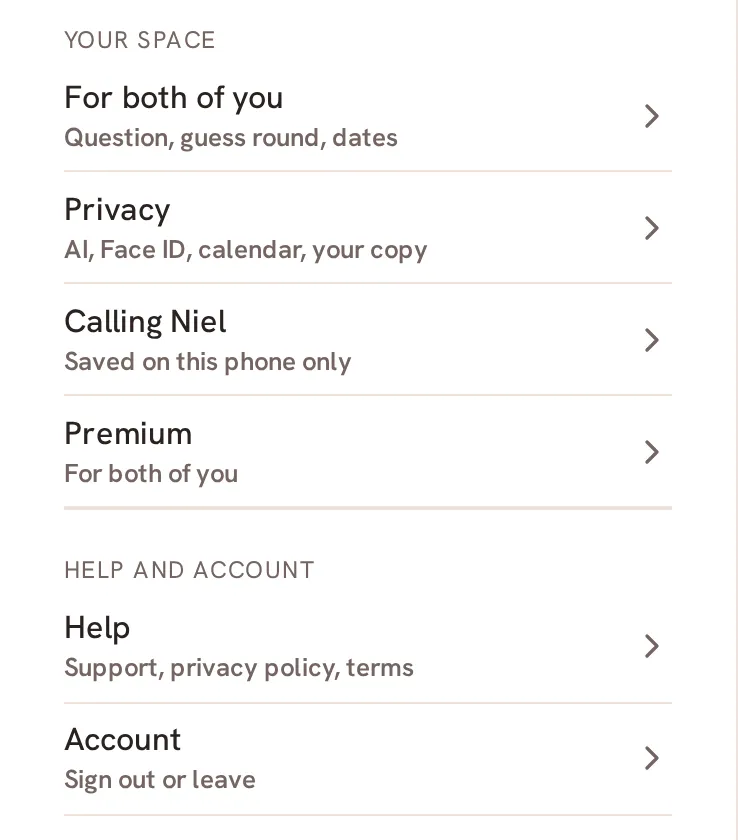
- Tap Premium. It sits under Your space.
- Read the heading and the line under it. The heading is Free · for both of you, First month · for both of you or Premium · for both of you.
- On Free or in your first month, tap See Premium to open the Premium sheet.
- Tap Restore purchases if you already pay with this Apple ID or Google Play account.
- Wait while the store answers. Once Saath has confirmed it, Premium is on for you both. Tap Done.
Saath Couples App
Join the waitlistWhat your partner sees
Premium covers you both, so once it is on, your partner is covered too and is never charged. Their Premium page says that you got Premium for you both. Only the person who pays sees the store, the renewal date and the link to manage the subscription.
Questions about Premium
What does Premium add in the Saath couples app?
All your history in view, weekly ideas and trips with their costs, and room for years of photos and videos. On Free you still have moods, chat, plans and today's question. The app shows your last 30 days, and earlier days are kept safely.
Is the Saath couples app free to use?
The everyday stays free for both of you. Everything is included during your first month, and after that the everyday stays free.
What if no earlier purchase is found?
The sheet tells you that no earlier purchase was found for this Apple ID or Google Play account. Check that you are signed in to the same store account that paid.
What if my store account already pays for another Saath account?
The sheet says so. Sign in to that Saath account to use it, or manage it in your store's subscriptions.
What if I have no signal?
The sheet says Connect to the internet to buy or restore. Try again once you are back online.
What if the purchase does not finish?
If the store shows a charge but Premium is not on, tap Restore purchases. If the store found your purchase but Saath has not caught up, try again in a few minutes.
How do I cancel?
If you pay, your Premium page has a button to manage the subscription in your store. Cancel there at least a day before it renews.
More guides
Back to the guide hub. Next, read For both of you and Privacy.