Browse guides
Saath Couples App · Today
How to tell your partner what you need without writing a message
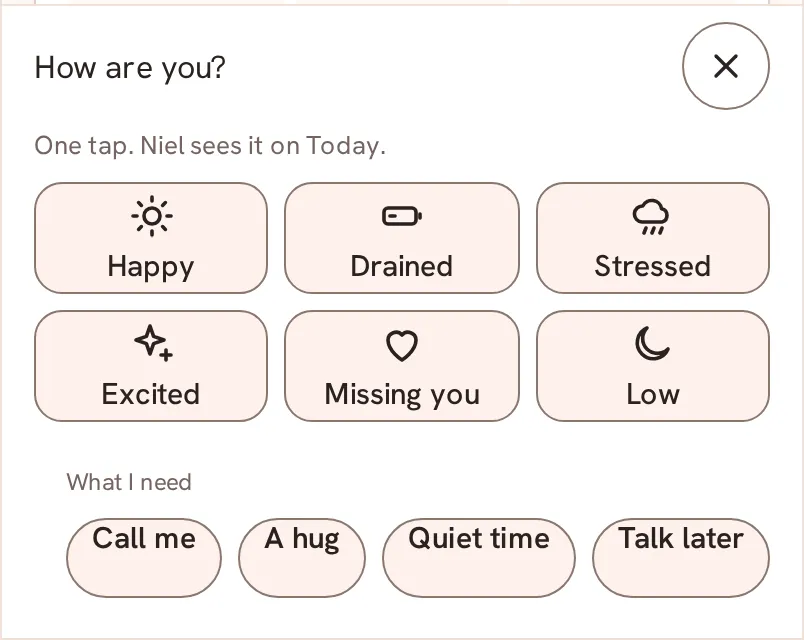
In the Saath couples app you can ask for what you need in one tap. Open How are you?, pick a chip under What I need, and your partner gets a short card with three ways to answer. You see their answer on your Today.
Some days the words are too much, and in the Saath couples app a need is one tap that your partner can answer in one tap.
Ask for what you need
- Open Today and tap How are you? at the bottom.
- Under What I need, tap a chip: Call me, A hug, Quiet time or Talk later.
- A bar at the bottom reads Asked for: and the name of your need, with Undo. Tap Undo if you tapped by mistake. Otherwise the need is sent.
- To use your own words, tap Help with... or Something else, type up to 60 characters in the box and tap Send. Tap Cancel to close the box. Help with... keeps "Help with" in front of what you type.
- To send a heart with no request, tap Thinking of you in the same row.
- Wait for the answer. It appears on your Today as a line with a tick, for example your partner's name and On it.
- To withdraw a need that has not been answered, tap Take back next to its line. It is withdrawn for both of you.
Saath Couples App
Join the waitlistWhat your partner sees
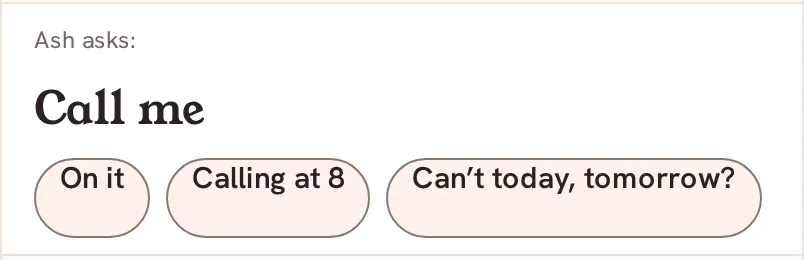
Your partner sees a card on their Today that starts with your name and the word asks, then your need. Under it are three answers. For Call me they are On it, Calling at 8 and Can’t today, tomorrow?. For the other needs the middle answer is Tonight. The last answer always offers another time, so nobody has to say no. After they tap one, both phones show the same line.
Questions about needs
Do I have to pick a mood first?
No. What I need works on its own. You can also share a mood with it, as described in How to share a mood.
How long does a need stay?
A need leaves Today by itself after 24 hours. Nothing says "seen" or "ignored" about it.
What if I have no signal?
The chips show Needs connection and do not send. A need you already sent while the connection dropped shows Waiting to send until it goes through.
What if it does not send?
You see Could not send. Try again. with Retry. If a note says the need may already have been sent, check Today first, then try again.
Who sees my need in the Saath couples app?
Only your partner. A need is a small signal between the two of you.
Back to the guide hub, or read Reply to a mood and Chat for two.