Browse guides
Saath Couples App · Today
What each part of the Today screen shows
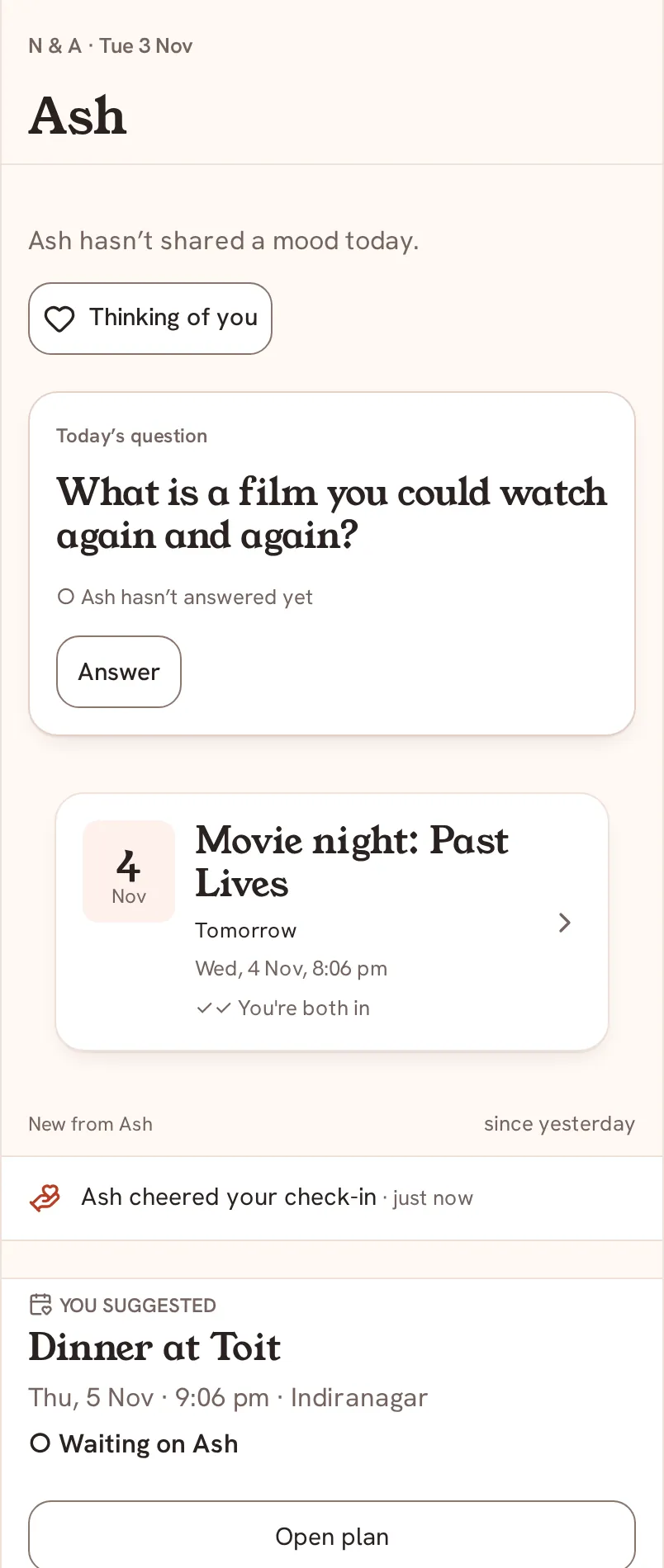
Today is the first screen of the Saath couples app. It shows your partner's mood, one question, what needs your answer, your plans, the week between you, your goals and the How are you? bar. This guide names each part, from top to bottom.
Today is the one screen that is about the two of you right now, and in the Saath couples app it changes as the day does.
Read Today from top to bottom
- At the top is a small line with both your initials and the date, and under it your partner's name in large letters.
- Under the name is your partner's mood and how long ago they shared it, for example Missing you. If there is none, it says your partner has not shared a mood today. If your partner has not joined yet, it says you are waiting for them.
- Next to the mood are Reply and Thinking of you. See Reply to a mood.
- The first card is Today’s question, or This week’s guess on Saturdays. It shows whether your partner has answered yet. See Today's question and the guess round.
- When your partner asks for something, a card starts with their name and the word asks, with answers to tap. See Say what you need.
- Plan cards show what is next. A plan your partner suggests has icons to answer. A plan you suggested shows Waiting on their name, and Open plan takes you to it.
- This week between you lists moments you each shared, with Reply and See the whole week to open more.
- New from your partner's name lists what happened since you last looked, such as a cheer.
- What you're each working on shows your goals. Check in is for yours and Cheer is for your partner's.
- At the bottom, the How are you? bar opens your mood and What I need. Below it are the tabs Today, Chat, Plans and Us, and the + button in the middle.
Saath Couples App
Join the waitlistWhat your partner sees
Your partner has the same screen with your name at the top, your mood and your cards. Whatever you share on Today goes to your partner and to nobody else.
Questions about Today
Why does my Today look different from yesterday?
Cards appear when there is something to show and leave when it is done. A mood clears after twelve hours and a need after 24 hours, so a quiet day has fewer cards.
Why does it say Offline?
Today keeps the last view it loaded and shows Offline · as of the time. Anything that needs a connection says Needs connection until you are back online. See Saath without a connection.
Where did my alerts prompt go?
When alerts are off, a card can offer Set up alerts or Not now. You can set them later in Settings. See Alerts.
Who can see my Today in the Saath couples app?
Only you and your partner. See Privacy.
Back to the guide hub, or read Getting started.