Browse guides
Saath Couples App · Settings and account
Sign out on this phone or on your other devices
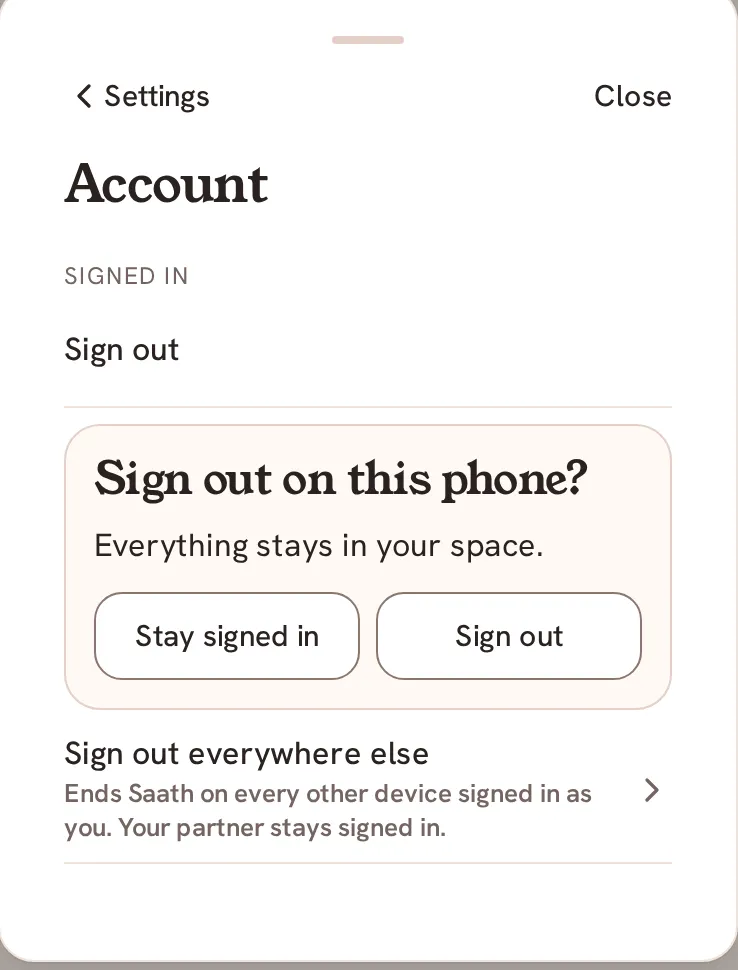
In the Saath couples app you sign out from Settings. Open Settings, tap Account, then Sign out, and confirm. Everything stays in your space, and your partner stays signed in. You can also use Sign out everywhere else.
Sign out of Saath
Signing out in the Saath couples app ends your sign-in on this phone and nothing else. Account in Settings is where you do it.
- Tap the gear icon at the top to open Settings.
- Tap Account. It is the last row, under Help.
- Under Signed in, tap Sign out.
- Read the question Sign out on this phone? Everything stays in your space.
- Tap Sign out to finish, or Stay signed in to change your mind.
To end Saath on every other device you use, tap Sign out everywhere else in the same group, then Sign out others. Tap Cancel to back out.
Saath Couples App
Join the waitlistWhat your partner sees
Nothing changes for your partner. Signing out ends only your own sign-in, and your partner stays signed in on their own phone.
Questions about signing out
Does signing out of the Saath couples app delete anything?
No. Everything stays in your space. Sign in again with the email you use for Saath whenever you like.
What does Sign out everywhere else do?
It ends Saath on every other device signed in as you. The phone you are holding stays signed in. When it works, you see Signed out on your other devices.
What if Sign out everywhere else fails?
You see Could not sign out your other devices. Check your connection and try again. Check your signal and tap it again.
Can I undo it?
Signing out is not a loss, so there is nothing to undo. Sign in again to carry on where you left off.
More guides
Back to the guide hub. Next, read For both of you and Privacy.