Browse guides
Saath Couples App · Plans
Answer your partner's plan with Accept, Pass or Different time
In the Saath couples app you answer a plan with one tap. Tap Accept to say yes, Pass to say not this time, or Different time to suggest another day. You can answer on Today, in Chat or on Plans, and a bar at the bottom gives you a few seconds to undo it.
Answering a plan in the Saath couples app takes one tap, and your partner sees your answer on their own phone.
Answer a plan
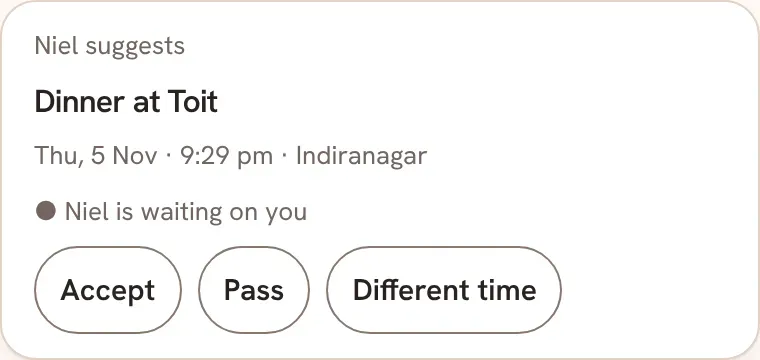
- Find the plan. It shows on Today as a card with your partner's name, the plan, the day, the time and the place, and a line that says your partner is waiting on you. It also shows in Chat and on Plans, under Waiting on you.
- On Today and in Chat, answer with the row under the plan. In Chat the row has three buttons: Accept, Pass and Different time. On Today the same three answers are icons: a calendar with a tick, a calendar with a cross and a calendar with a clock.
- Tap Accept to say yes. A bar at the bottom says Accepted. Tap Undo while it shows if you change your mind.
- Tap Pass to say not this time. The bar says Moved to Passed, with Undo. The plan stays on your list.
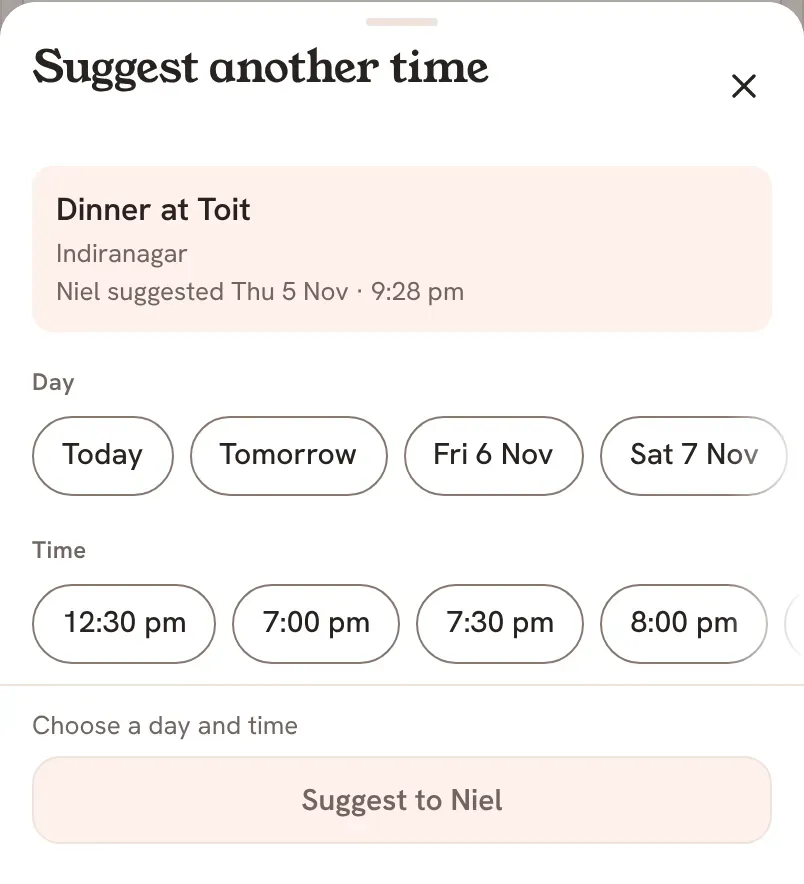
- Tap Different time to suggest another day or hour. The Suggest another time sheet opens. Pick a Day and a Time, then tap the button at the bottom that starts with Suggest to and your partner's name.
- On Plans, the card has I'm in and Can't make it. Tap Can't make it to choose Suggest another time or Not this time.
Saath Couples App
Join the waitlistWhat your partner sees
When you accept, you both see the plan under Coming Up with You're both in.
When you pass, your partner sees on Today that you passed, with Open plan. On Plans they see that you can't make that day, and the plan stays on Our list with Suggest another time.
When you suggest another time, your partner gets the plan again with the new time and a line that says what it was before. They answer it the same way. You see Your suggestion and Waiting for their name until they do.
Questions about answering a plan
Can I undo my answer?
Yes, for a few seconds. Tap Undo on the bar at the bottom while it is showing. Nothing is sent until the bar goes away.
What if I have no signal?
Your answer waits on your phone. Saath says Sends when you're back online, and sends it when you reconnect. If the plan changed in the meantime, Saath says the plan changed while you were offline and asks you to answer again.
What if my answer does not save?
Saath says Could not save your answer. Try again. Tap your answer once more.
What happens to the plan when I tap Pass?
It is not deleted. It stays on Our list, and either of you can suggest a new time for it later.
Who can answer a plan in the Saath couples app?
The person who did not suggest it. The person who suggested it is already in, so they wait for your answer.
How do I change a plan that we both accepted?
Open the plan on Plans and use Change time. The guide on plan details shows how: Open a plan to book it, change it or cancel it.