Browse guides
Saath Couples App · Add something
Add things by typing or speaking, and check them first
In the Saath couples app, Type or say it turns a few words into changes you can check. Type or speak, tap Review, read each change on Check these, and tap Save. Nothing saves until you do.
Type or say it lets you add something to the Saath couples app in your own words, and nothing is saved until you have read it and agreed.
Type or say it, then check it
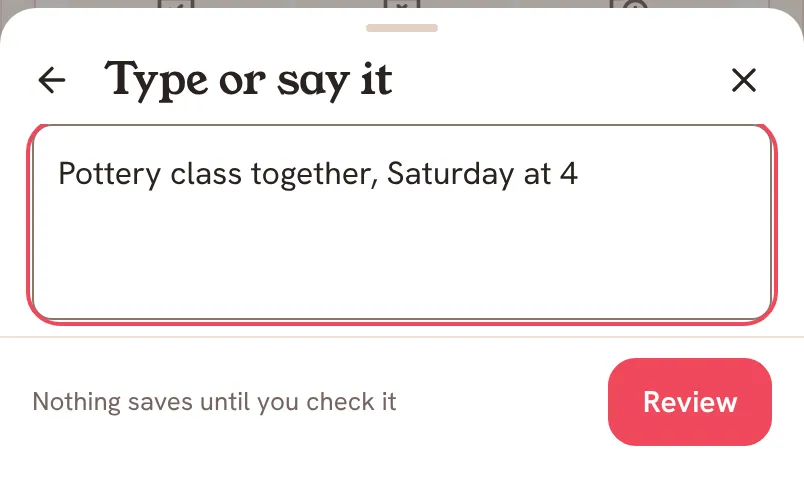
- Tap the + button, then Type or say it. The line under it says You check before anything saves.
- Write in the box called What to add, for example a moment, a to-do, or an idea for our list. On a phone that can turn voice into text, tap Say it, speak, then tap Stop listening. Your words appear in the box. Nothing sends by itself.
- Tap Review. Saath reads your words with an AI service and shows Reading it…. Tap Cancel to stop.
- On Check these, read each change. The note says From what you wrote. Nothing is saved yet. Each row names where it would go, such as Our list · Plans, Plan · Coming up, Message · Chat, Mood · Today or Question · Today.
- Tap Remove on any row you do not want, or Edit your words to change what you wrote.
- Tap Save. Saath saves only the rows you kept and shows Undo for a few seconds.
Saath Couples App
Join the waitlistWhat your partner sees
Before you save, the note beside Save says who will see the changes: your partner's name followed by sees it or sees them, or Only you see this. Nothing reaches your partner until you tap Save.
Questions about Type or say it
Do I need to switch anything on in the Saath couples app?
Yes, the Reviewed capture switch. Open Settings, tap Privacy, and under AI features switch Reviewed capture on. It is off until you switch it on. If it is off, Saath tells you where to turn it on.
What does Saath send?
Only the words you wrote, and only when you tap Review. Your words stay on this phone while you work, and nothing is recorded, sent or read before you tap Review.
Can I undo it?
Before you save, remove any row or tap Cancel. After you save, tap Undo on the bar.
What if I have no signal?
The note says Reading needs a connection. Your words stay here. and Review waits. If you lose signal on Check these, it says Saving needs a connection. Your changes stay here. Saath keeps them until you are back.
What if it cannot read my words?
Saath may say Please add a little more detail. Add more and tap Review again. If it says Could not read it. or Could not save these. Try again., your words are still there. Tap Try again.
Why is Say it missing?
It shows only on a phone that can turn voice into text. If you tap it and nothing is heard, Saath says No speech was heard. Please try again. Type instead.
How long can my words be?
The box holds up to 4,000 characters.