Browse guides
Saath Couples App · Plans
Save ideas to Our list and plan them when you are ready
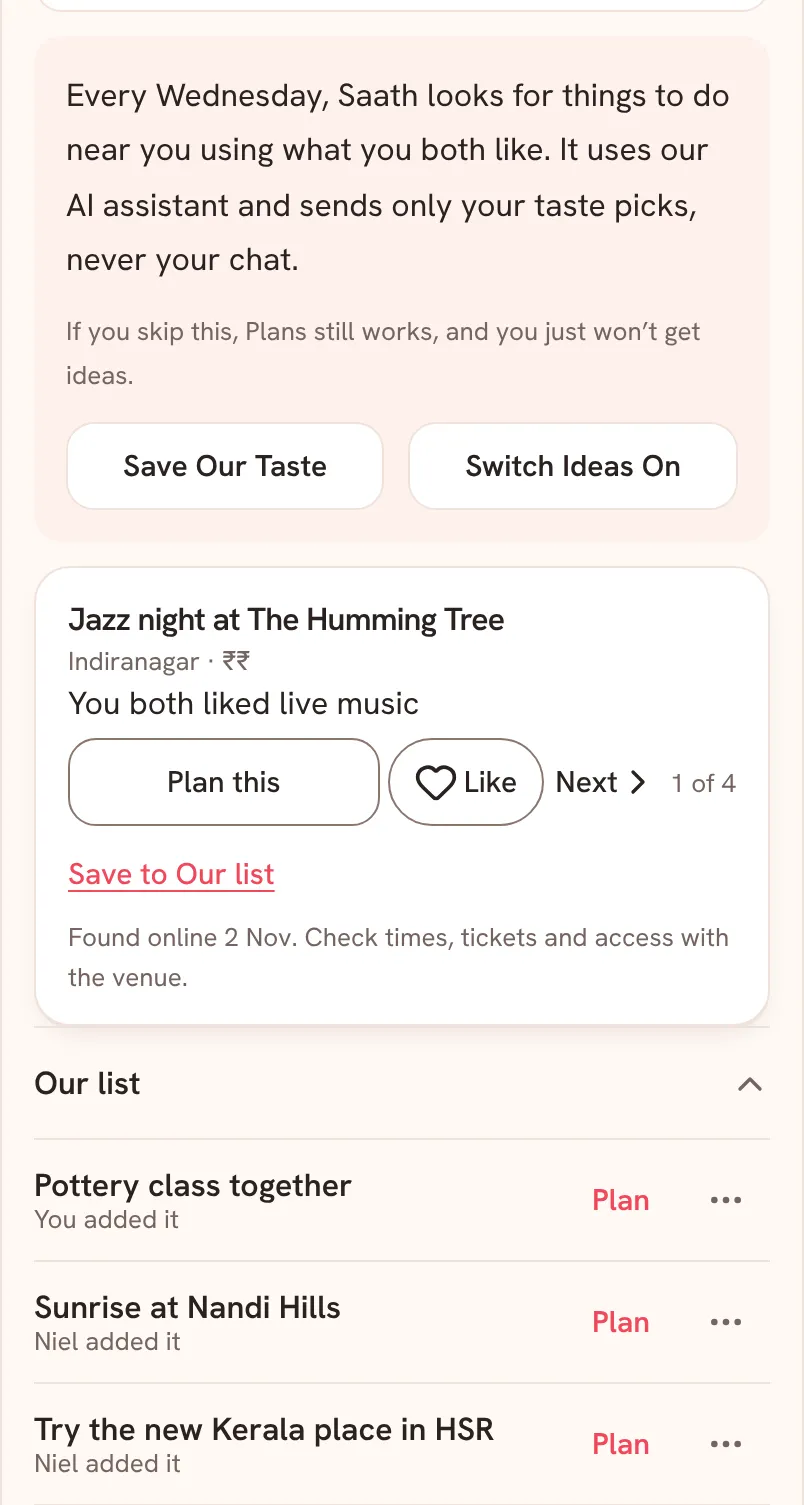
In the Saath couples app, Our list is the place for things you both want to do someday. Tap Save to Our list or Like on an idea, then tap Plan on any row when you want to give it a day.
Our list keeps the ideas you and your partner want to try in one place in the Saath couples app, with a line on each row that says who put it there.
Save an idea and plan it later
- Open Plans. On an idea card, tap Save to Our list. The card then says In Our list ✓, and a bar offers Undo for a few seconds.
- Or tap Like on the card. An idea either of you likes joins Our list too.
- To save a place or a link of your own, tap the + button on Plans, then Idea. Fill in Title, add a Link or Area if you have them, and tap Save.
- Scroll to the end of Plans and tap Our list. The row shows the newest item and how many more there are. Tap it to open the whole list.
- Read the line under each item: You added it, your partner's name followed by added it, You liked it, or You both liked it.
- Tap Plan on a row. The Plan something sheet opens with the title filled in. Pick the Day and Time, then tap Send to followed by your partner's name.
Saath Couples App
Join the waitlistWhat your partner sees
Our list is shared. Everything you save or add shows on your partner's Plans too, with a line that names you. A like shows as your name liked it, and as You both liked it once you have both tapped it. When you send a plan from a row, your partner gets it to answer, as with any plan.
Questions about Our list
How do I take something off Our list?
Tap More on the row. For something you added, tap Delete plan. For an idea you liked, tap Remove, which takes back your like. Saath holds the change for five seconds and shows Undo on a bar. If your partner also liked the idea, it stays on their list.
Why do I not see Our list on Plans?
The row appears once the list has something in it. Save an idea, like one, or add your own, and it shows up.
What if I have no signal?
An idea you add with the + button saves when you are back, and a like says Sends when you’re back. Removing an item needs a connection: the list says Reconnect to remove one. Plan this on an idea card needs a connection too.
Are the ideas always right?
No. Each idea says when it was found online. Check times, tickets and access with the venue before you go.
Is Our list private in the Saath couples app?
Only you and your partner can open your space, and Our list is part of it. There is no public page and no share link.