Browse guides
Saath Couples App · Us
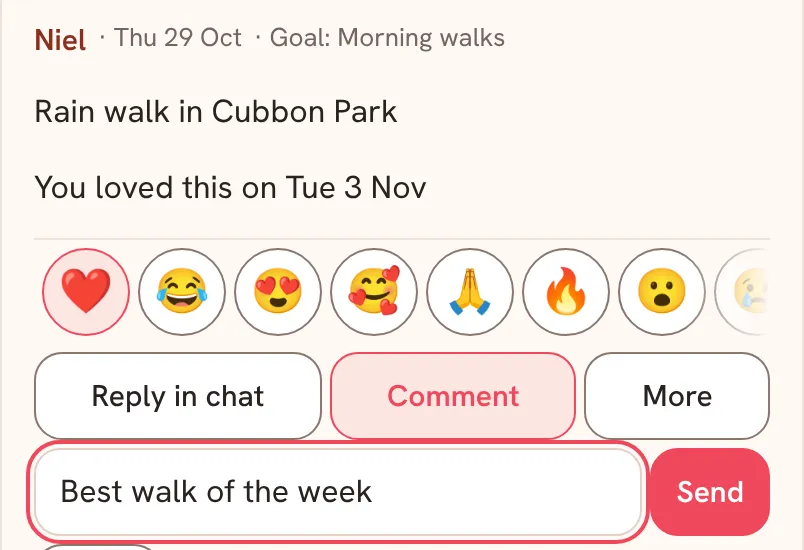
React to a moment with an emoji and reply with a comment
In the Saath couples app you can answer any moment your partner shares without leaving it. Open Us, tap the moment, then tap an emoji to react, Comment to write a line, or Reply in chat to talk about it.
React to a moment
Reacting to a moment in the Saath couples app takes one tap, and your partner sees it on the moment.
- Open Us. Your moments sit under Our story, grouped by month.
- Tap the heart next to a moment your partner shared to love it, or tap the moment to open it.
- In the row of emojis, tap one to react. Slide the row sideways to see more.
- Tap Comment, write in Add a comment, then tap Send.
- Or tap Reply in chat to talk about the moment in Chat.
- Tap Close when you are done.
On Today, a moment your partner shared appears under This week between you with a Reply button that opens the same comment box.
Saath Couples App
Join the waitlistWhat your partner sees
Under the moment, your partner sees how you answered it, for example that you loved it, or that you reacted with an emoji and said something, with the day. Your comment appears on the moment for both of you.
Questions about reacting and replying
Can I change or take back my reaction?
Yes. You have one reaction on a moment. Tap a different emoji to swap it, or tap the same emoji again to take it back. When you have reacted, Remove my reaction also appears at the end of the row.
Can I react with a double tap?
On a photo in a moment, two quick taps toggle your heart. The heart button stays there as well.
Can I edit or remove my comment?
Yes. Your own comments have Edit and Remove options. A comment can be up to 1,000 characters.
What if I have no signal?
A reaction or comment you make offline waits on your phone and sends, in order, when you are back online. If the app cannot confirm it, it says The reaction was not confirmed. Please try again.
Can I react to a moment that is still sending?
Reactions appear once a moment has been sent. One that is still sending does not show them yet.
Is this free in the Saath couples app?
Reacting and commenting are not on the list of what Premium adds. Open Settings and tap Premium to see what it does cover.
More guides
Back to the guide hub. Next, read Us and Chat.