Browse guides
Saath Couples App · Settings and account
Save your partner's number for one-tap calls
In the Saath couples app you can save your partner's phone number so a plan to call each other has a Call and a WhatsApp button on Today. Open Settings, then Calling. The number stays on your phone only.
Save a number for calls
Calling your partner in the Saath couples app uses a number you save yourself.
- Open Us, then tap the gear icon at the top to open Settings.
- Under Your space, tap Calling with your partner's name next to it.
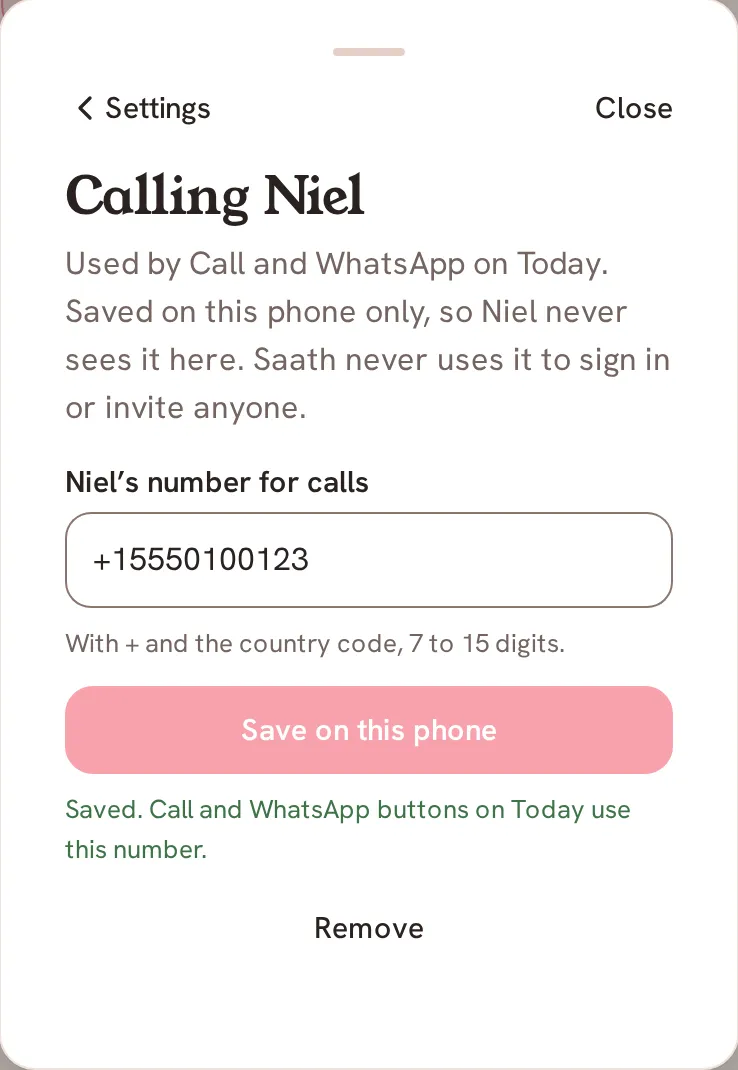
- In the box for their number for calls, type it with + and the country code, 7 to 15 digits.
- Tap Save on this phone. Saath says: "Saved. Call and WhatsApp buttons on Today use this number."
- On Today, when your next plan is a call that day, tap Call to ring them, or WhatsApp to open a chat with them there.
- To change it, tap Change on Today, or edit the number in Calling. To delete it, tap Remove.
Saath Couples App
Join the waitlistWhat your partner sees
Nothing. The page says: "Saved on this phone only, so your partner never sees it here. Saath never uses it to sign in or invite anyone."
Questions about calling your partner
When do the Call and WhatsApp buttons show?
On Today, in your next plan, when the plan has the word call in its title and it is today. If you have not saved a number yet, that spot offers to add your partner's number instead.
Where is the number kept?
On this phone only, not on Saath's servers. A new phone, or signing in somewhere else, means saving it again.
What if the number is not accepted?
Saath asks for "the number with + and the country code, 7 to 15 digits." If you save the same number again it says "Change the number to save."
Does WhatsApp need anything from me?
The WhatsApp button opens a chat with that number in WhatsApp, so WhatsApp has to be on your phone. Saath does not send anything for you.
Is there a good time to call?
If your clocks differ, Today can say "Good time to call" with the stretch you both are awake, between 8:00 and 22:00 your own time.
What if I have no signal?
Saving the number works without a connection, because it stays on your phone. The call itself needs your phone's network.
Related guides: Share a mood and Alerts. Back to the guide hub.