Browse guides
Saath Couples App · Us
Start a goal together, check in and cheer each other on
A goal in the Saath couples app is something one or both of you are working on, with check-ins. Open Us, tap Together, then Start something and A goal. Each check-in shows for you both, and you can cheer each other on.
Start a goal and check in
A goal in the Saath couples app keeps what you are working on in one place, with check-ins that you both see.
- Open Us, tap Together, then tap Start something.
- Tap A goal and write the goal under What's the goal?
- Choose Ours or Mine.
- Under What kind of goal? pick A number to reach, A number to add up, Do regularly or A milestone. Add a target if it asks for one.
- Tap Start the goal. It appears under Goals.
- Open the goal and tap Check in. Add a number, a line, or tap Add a photo, then tap Save check-in.
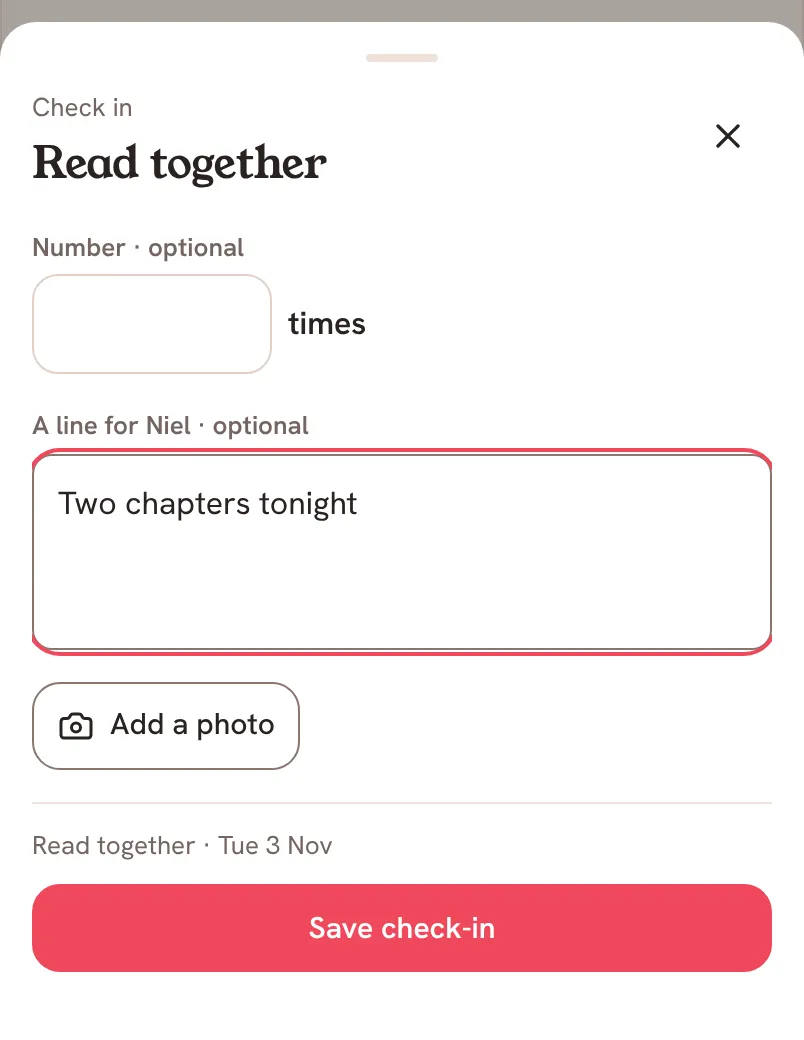
For A milestone, you tap Mark done when you are ready, and it is done for both of you. For Do regularly, you set Times a week.
Saath Couples App
Join the waitlistWhat your partner sees
Each check-in shows on the goal for both of you, and the goal's page says when your partner has not checked in yet. When you tap Cheer on your partner's goal, they see on Today that you cheered them on.
Questions about goals
What is the difference between the goal kinds?
A number to reach uses your latest check-in as where you are, like a weight or a pace. A number to add up adds every check-in, like km run or books read. Do regularly counts check-ins each week. A milestone is one yes, when you are ready.
Can I undo a check-in?
Yes. After you save, the app says Saved for both of you with Undo. Later, tap More on a check-in to Edit it or tap Remove check-in. Keep in Memories keeps a check-in as a memory.
Can my partner see a goal marked Mine?
Yes. Goals stay visible to both of you. Only the person a goal belongs to adds check-ins, and the other one can cheer.
How do I cheer on a check-in?
Tap Cheer next to your partner's check-in, or Cheer on their goal in Together. You can take a cheer back with Undo cheer.
What if I have no signal?
Your check-in is saved on your phone and the app says it will sync when the connection is back. A cheer sent offline waits and sends when you are back online. Marking a milestone done needs a connection.
Can I change a goal later?
Yes. Open the goal and tap Edit goal, or tap Weekly reminder. Tap Talk about it in Chat to discuss it.
Is this free in the Saath couples app?
Goals are not on the list of what Premium adds. Open Settings and tap Premium to see what it does cover.
More guides
Back to the guide hub. Next, read Us and Reacting to moments.