Browse guides
Saath Couples App · Us
Mark a trip as a visit and see its postcard on Today
A visit is a shared trip that one of you, or both, travels for. In the Saath couples app, open the trip, tap Edit trip, switch on This is a visit, and a postcard appears on Today for you both.
A visit in the Saath couples app is a trip you share, with who travels and, if you want, when they leave and arrive. It is for the days when one of you is far away, or both of you are on the way to each other.
Mark a trip as a visit
- Open Us, tap Together, and tap a trip you share. A trip that is only for one of you cannot be a visit.
- Tap More, then Edit trip, and open Details, optional.
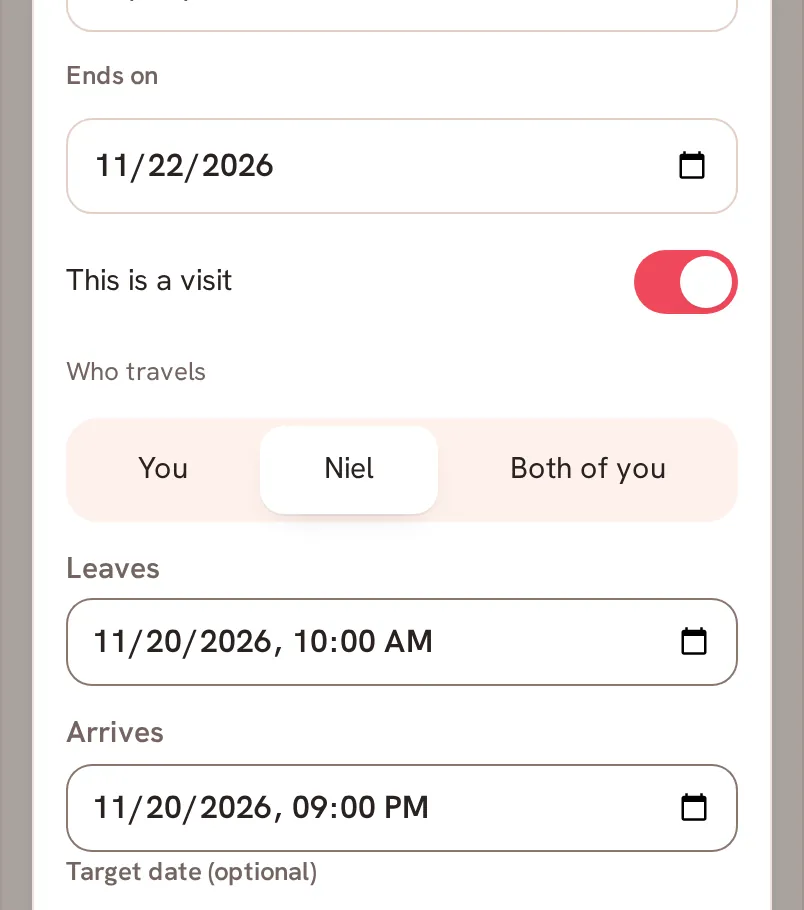
- Check that For is set to Together, and that Starts on and Ends on both have a day. Without them the switch stays off and says Add the first and last day first.
- Turn on This is a visit.
- Under Who travels, choose You, your partner's name, or Both of you.
- If you like, fill in Leaves and Arrives. The arrival has to come after the departure, or the sheet says Arrives must be after leaves.
- Tap Save.
Saath Couples App
Join the waitlistWhat your partner sees
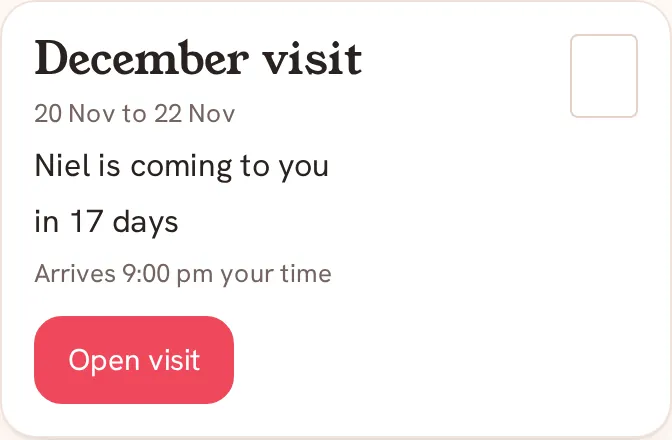
On Today, a postcard appears for both of you with the trip name, its dates and a countdown such as "in 17 days", "Tomorrow" or "Today". It then says "You're together" until the last day. Each of you reads the line from your own side: "Niel is coming to you", "You're going to Ash" or "You're both travelling". If you set an arrival time, it reads "Arrives 9:00 pm your time", in the time zone of the phone that shows it. Open visit opens the trip.
Questions about visits
Why can't I turn on This is a visit?
The switch needs a first and a last day on the trip, and the trip has to be shared. If For is set to one person, change it to Together first.
Can I undo it?
Yes. Open the trip again, tap More, then Edit trip, turn This is a visit off and tap Save. The trip stays, and only the postcard goes.
What if I have no signal?
The visit fields wait for a connection and show Needs connection. Open the trip sheet again when you are back online.
What if saving the visit fails?
The trip can save while the visit does not. The sheet then stays open with Trip saved. Could not save the visit. Try again. and keeps what you chose. If your partner changed the visit at the same moment, you see This visit changed. Check it and try again.
Does my partner need to do anything in the Saath couples app?
No. The postcard appears on their Today by itself once you save.