Browse guides
Saath Couples App · Plans
Put your plans in your phone's calendar
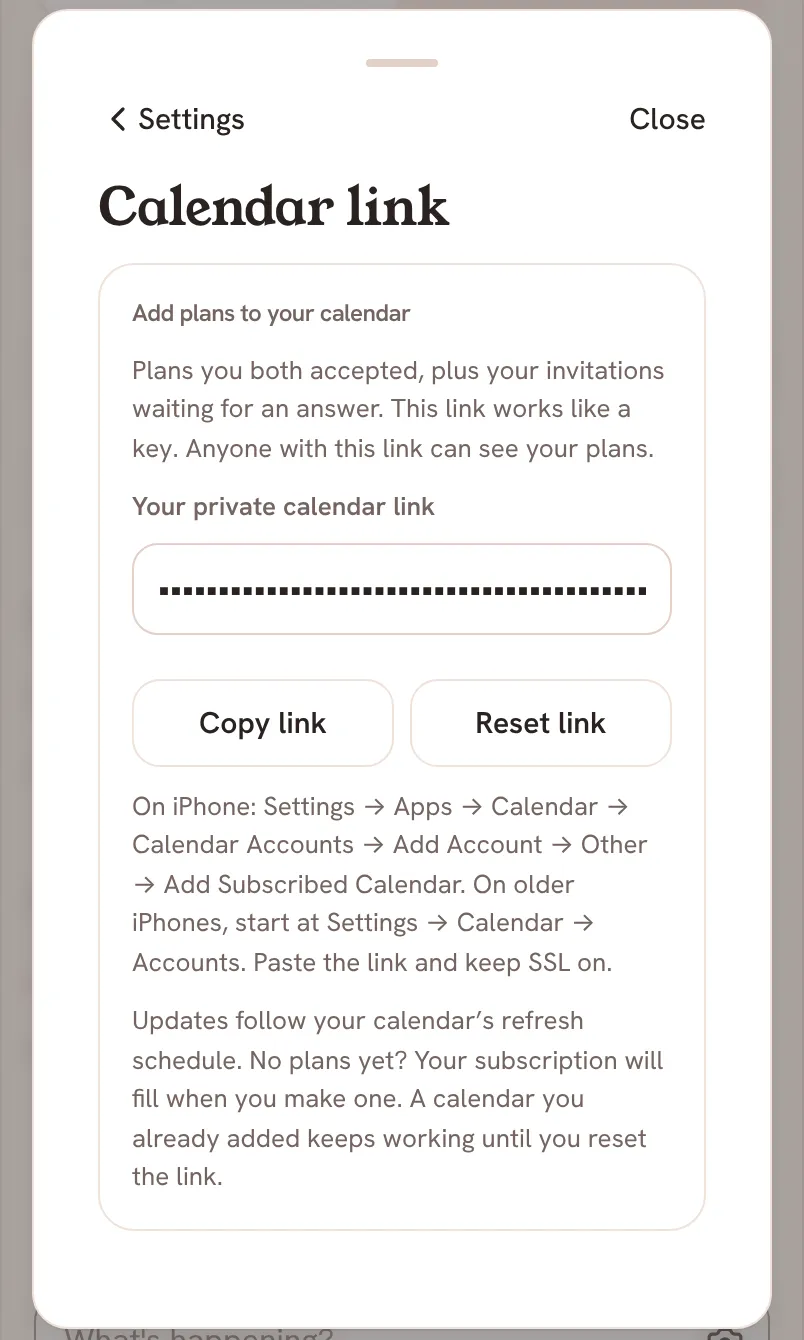
The Saath couples app gives you a private calendar link. Copy it from Settings, then Privacy, then Calendar link, and subscribe to it in your phone's calendar. Plans you both accepted show up there.
The calendar link lets the Saath couples app put your shared plans in the calendar you already use, so you see them next to everything else.
Add your plans to your calendar
- Open Us, tap the gear icon at the top to open Settings, then tap Privacy.
- Tap Calendar link. The page is called Add plans to your calendar.
- Under Your private calendar link, tap Copy link. Saath says Link copied.
- On an iPhone, open the phone's Settings, then Apps, Calendar, Calendar Accounts, Add Account, Other, and Add Subscribed Calendar. On older iPhones, start at Settings, Calendar, Accounts. Paste the link and keep SSL on.
- If you ever need a new link, tap Reset link, read the warning, and tap Confirm reset. Tap Cancel to keep the old one. Saath says Link reset. Add the new link to your calendar.
Saath Couples App
Join the waitlistWhat your partner sees
Nothing. The link belongs to you alone, and your partner has their own. The calendar shows the plans you both accepted, plus the invitations waiting for your answer. Your partner sees plans only the way they always do, on Today, in Chat and on Plans.
Questions about the calendar link
Is the calendar link private in the Saath couples app?
It works like a key. Anyone who has the link can see your plans, so keep it to yourself. If it goes anywhere you did not mean, tap Reset link.
What happens when I reset the link?
The old link stops fetching updates. Remove the old subscription from your calendar, then add the new link. Your calendar may keep plans it already downloaded.
When do new plans show up?
Updates follow your calendar's own refresh schedule, so a new plan can take a while. If you have no plans yet, the subscription fills when you make one. A calendar you already added keeps working until you reset the link.
Does it work on Android?
Saath shows steps for the iPhone. The link is a standard calendar subscription link, and Saath does not show steps for other calendar apps.
What if the page will not load?
With no signal the page says Offline · Connect to get your calendar link. If it says Could not load your link. Try again., tap Retry. If it says Calendar is being switched on., tap Retry a little later. If copying fails, Saath says Could not copy. Select the link and copy it.