Browse guides
Saath Couples App · Add something
Add a photo to a moment in Saath
In the Saath couples app, tap the plus button, choose Photo, pick up to six photos, add a few words if you like, check the day and time, and tap Share. Your partner sees it on Today, and it is kept in Our story.
A moment is a small thing you keep together, and in the Saath couples app a photo is the easiest way to start one.
Add a photo to a moment
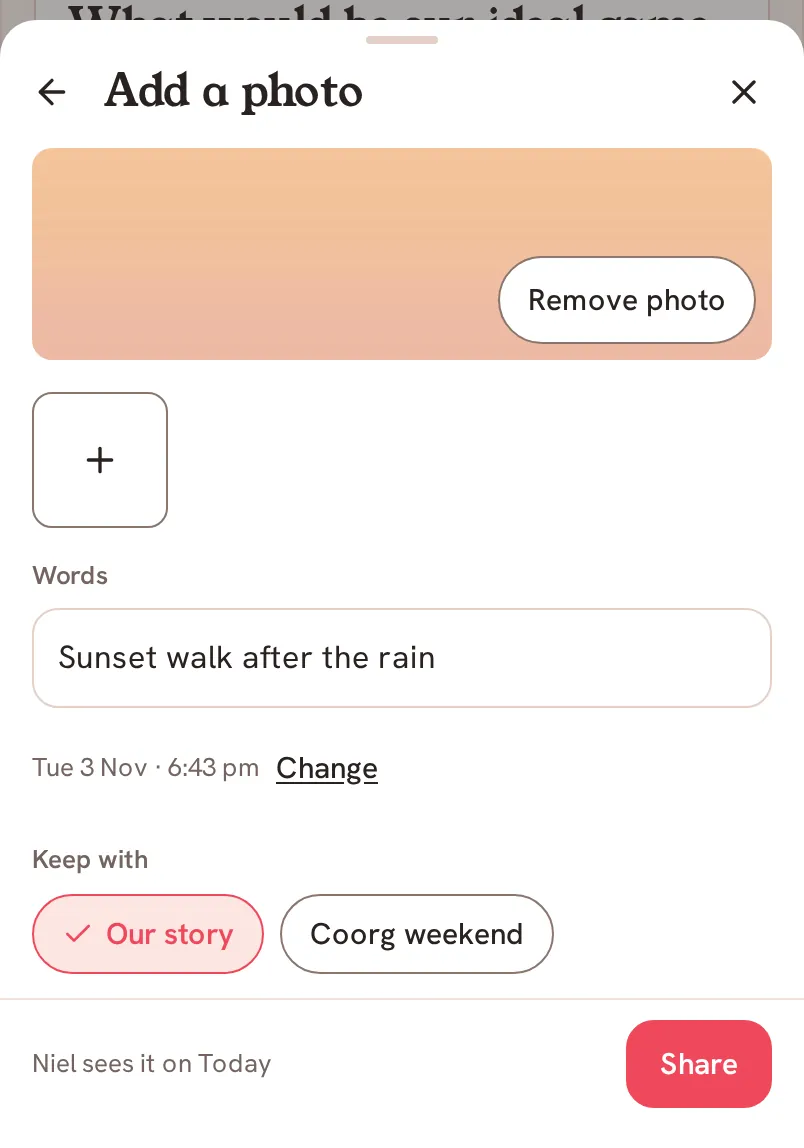
- Tap the + button in the middle of the bottom bar, then tap Photo. You can also tap the camera icon at the end of the What's happening? line on Us.
- In Add a photo, tap Choose photos to pick from your phone, or Camera to take one now.
- To add more, tap the + box under the first photo. A moment holds up to six photos. Remove photo takes the first one out.
- Type a few words in the box under Words if you want to. They are optional.
- Check the day and time under the words. The default is now. Tap Change if the photo belongs to another day.
- Under Keep with, choose Our story, or one of your trips or goals if it belongs there.
- Read the line beside the button. It tells you where your partner will see it. Then tap Share.
Saath Couples App
Join the waitlistWhat your partner sees
Your partner sees the photo and your words on Today, and it joins Our story for both of you. After you tap Share, a bar at the bottom says Sharing… and then tells you it is shared. It has an Undo button for about eight seconds, in case you tapped too soon.
Questions about adding a photo
What kinds of photos can I add?
JPG, PNG and WebP files under 20 MB. If a photo cannot be opened, the sheet says Can't open this photo. Remove it or choose another. and Share stays dimmed until you remove it. If you choose more than six, the first six stay and the sheet tells you a moment holds up to six, so you can add the rest in another moment.
Can I add words without a photo?
Yes. Share needs at least a photo or a few words. With neither, the line beside the button says Add a photo or a few words and Share stays dimmed.
What if I have no signal?
You can still tap Share. The line beside the button says Sends when you're back, the moment waits on your phone, and it sends when you are online again. See using Saath offline.
What if sharing fails?
The sheet stays open with your photo and words kept. It says Could not share. and the button becomes Try again. Nothing is lost.
Is adding photos free in the Saath couples app?
Yes. The everyday stays free for both of you. Premium adds room for years of photos and videos. On Free, Our story shows your last 30 days, and earlier moments are kept safely. See Premium.
Who can see the photo?
Only you and your partner. See what stays private.
Next, see how moments are shown and searched in Our story, or how to send photos in a chat in Send photos in Saath.