Browse guides
Saath Couples App · Settings and account
Download a copy of what you made together
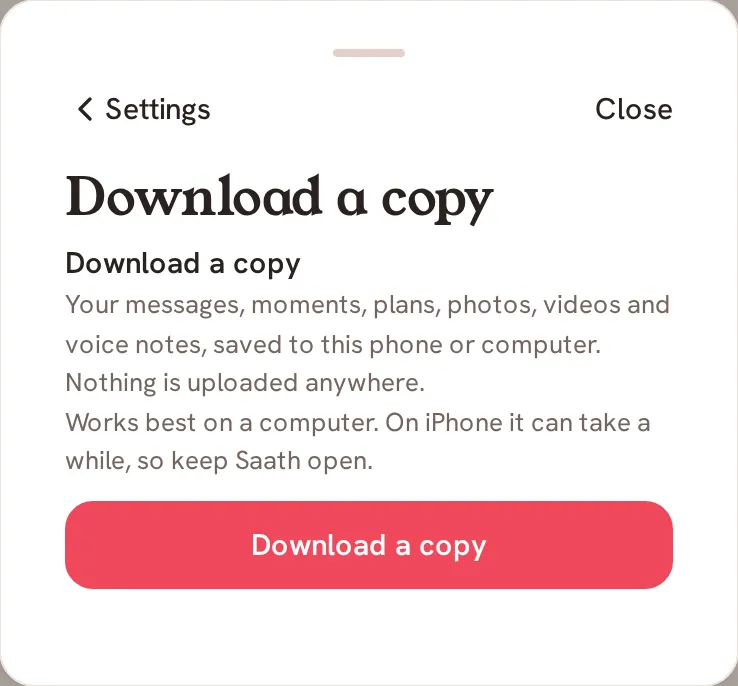
In the Saath couples app you can save everything you both see to your own phone or computer. Open Settings, then Privacy, then tap Download a copy. Nothing is uploaded anywhere, and it works best on a computer.
Download your copy
Download a copy lets you keep what the two of you made in the Saath couples app, in files you own.
- Open Us, then tap the gear icon at the top to open Settings.
- Tap Privacy.
- Under Your copy, tap Download a copy.
- Read the short note, then tap Download a copy again to start.
- Watch the progress. Saath gathers your messages, moments and plans first, then writes your file, then adds your photos, videos and voice notes.
- Keep Saath open until it says your copy is saved. You can tap Cancel at any time.
Saath Couples App
Join the waitlistWhat your partner sees
Nothing. Your copy is saved to your phone or computer only, and your partner is not told. Their own copy is made on their own phone.
Questions about downloading a copy
What is in my copy?
Your messages, moments, plans, photos, videos and voice notes. The page says: "Everything you can both see in the app now, saved to this phone."
Is anything uploaded?
No. The page says: "Nothing is uploaded anywhere." The files go to the phone or computer you are using.
Why does it work best on a computer?
A copy with many photos and videos can be large. The page says: "Works best on a computer. On iPhone it can take a while, so keep Saath open."
Can it come in more than one file?
Yes. A big copy is saved in parts, and Saath tells you when it is done, for example "Your copy is saved in 3 parts."
What if I have no signal or it stops?
You will see "Needs a connection. Reconnect, then try again." or "The download stopped. Try again to continue from the last finished file." Tap Try again to carry on. If you are signed out, sign in again, then try again.
Can I make another copy later?
Yes. When it finishes, tap Download another copy to start again.
Does it cost storage on my phone?
Yes, the files take room on the phone or computer you save them to. Check your free space first if you have many photos.
Related guides: Privacy and AI features. Back to the guide hub.