Browse guides
Saath Couples App · Alerts and widgets
Answer your partner from the lock screen
In the Saath couples app, some alerts show answer buttons on your lock screen. Press and hold the alert, tap an answer, and your partner gets it exactly as if you had answered inside Saath. The buttons appear only while the alert still waits on you and Hide previews is off.
The Saath couples app lets you answer some alerts straight from your lock screen, so a quick reply does not need the app open.
Answer an alert from the lock screen
- Open Settings, tap Turn on under the alerts line if alerts are off, and allow notifications when your phone asks.
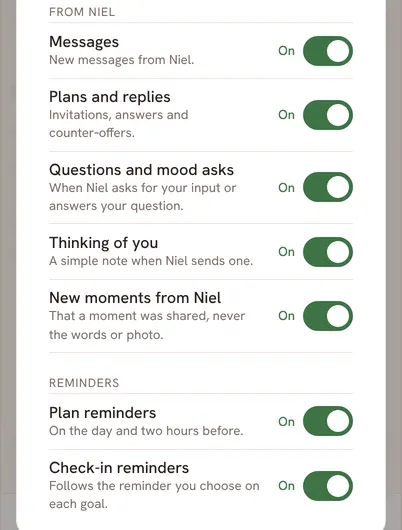
- Tap Choose alerts and check that the alerts you want are on.
- Leave Hide previews switched off. With it on, an alert shows no answer buttons.
- When an alert arrives, press and hold it on your lock screen to see its buttons.
- Tap one of the answer buttons.
- Saath sends the answer for you. It is recorded once.
Saath Couples App
Join the waitlistWhat your partner sees
Your partner sees the answer exactly as if you had tapped it inside Saath: a mood reply under their mood, "I’m in" on their plan, or Thinking of you back. You can answer each item once.
Questions about lock screen answers
Which alerts have buttons?
Four kinds. A mood from your partner offers its first two replies, with the reply that fits what they said would help first, such as A Hug, Want A Call? or I’m Here. A plan ask offers I’m in. A Thinking of you offers Thinking of you too. A need your partner shared offers its first two answers. No alert offers more than two buttons.
Why is there no button on my alert?
Buttons appear only while the item still waits on you, and only when Hide previews is off, which is how Saath starts. If you already answered inside Saath, or the mood has expired, the alert comes with its words and no buttons.
What if I want to say something different?
Tap the alert itself instead of a button. Saath opens on that card, and you can answer there.
What if I have no signal?
The buttons need your phone to be online when you tap. Open the alert in Saath once you are back online and answer there. See the guide on using Saath offline.
Where do lock screen answers work in the Saath couples app?
In the iPhone and Android apps, once alerts are on for that phone. They are not part of alerts in a web browser.
Can I undo a lock screen answer?
The answer is recorded once. Open Saath to see it on the card.