Browse guides
Saath Couples App · Plans
Get a reminder on the day of a plan and two hours before
In the Saath couples app, Plan reminders send you an alert on the day of a plan you both said yes to, and another two hours before it starts. Open Settings, tap Choose alerts and switch Plan reminders on or off for yourself.
Plan reminders in the Saath couples app are alerts that remind you of a plan you and your partner both accepted, so the plan does not slip your mind.
Turn plan reminders on or off
- Open Us, then tap the gear icon at the top to open Settings.
- If you see Alerts are off on this phone, tap Turn on and allow notifications when your phone asks. Reminders need alerts on this phone. The guide on alerts has the details: Turn on alerts and choose what reaches you.
- Tap Choose alerts.
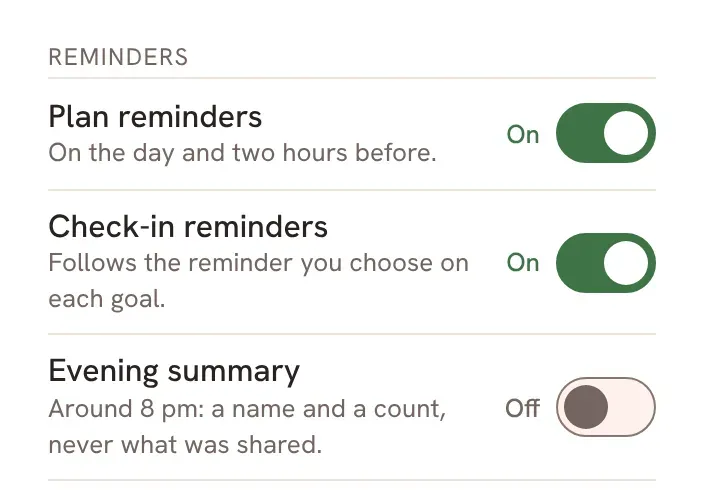
- Find the group called Reminders. The first switch is Plan reminders, with the line On the day and two hours before.
- Tap the switch to turn it On or Off. The change is saved for your account.
- If you want alerts to wait until the morning, tap Quiet hours on the same page. A plan within two hours still comes through.
Saath Couples App
Join the waitlistWhat your partner sees
Nothing changes on your partner's phone. The switch is yours alone, and your partner has their own. If you both leave Plan reminders on, you both get the reminders, each in your own time zone.
Questions about plan reminders
Which plans get a reminder?
Only plans you both said yes to. A plan that is still waiting for an answer, or that one of you passed on, gets no reminder.
When does the reminder come?
You get one on the day of the plan, from 8 am your time, and one two hours before it starts. A plan that starts in less than two hours gets one reminder, not two.
What does the alert say?
By default an alert says who it is from, not what it says. It reads that you and your partner have a plan today, or that your plan is coming up soon. If you switch on Show previews in notifications, the alert names the plan and the time.
Is this the same as Remind me later in Chat?
No. Remind me later keeps one message on Today until you come back to it. Plan reminders are alerts about plans.
Why did I not get a reminder?
Check that Plan reminders is On, that alerts are on for this phone, and that your phone is not blocking Saath. In Settings you can tap Send a test alert. If nothing arrives, tap Repair alerts on this phone.
Where do I change plan reminders in the Saath couples app?
Open Us, tap the gear icon for Settings, tap Choose alerts, and look under Reminders. The alerts themselves also need your phone's permission.