Browse guides
Saath Couples App · Get started
Together since, anniversaries and your own dates
In the Saath couples app, Our dates keeps the days that matter to you both. Open Us, tap Together, and add a date. Either of you can add, change or remove one, and each row shows how soon it comes.
Our dates is where the Saath couples app keeps the days you want to remember, such as when you got together, an anniversary or a birthday.
Add a date
- Open Us and tap Together.
- Scroll to Our dates and tap Add a date.
- Choose a kind: Together since, Anniversary, Birthday or Our own date.
- For Anniversary and Our own date, type a Title. For Birthday, choose whose it is.
- Fill in Day, Month and Year. Together since needs a year.
- Leave Remind us a week before and on the day ticked if you want reminders.
- Tap Save.
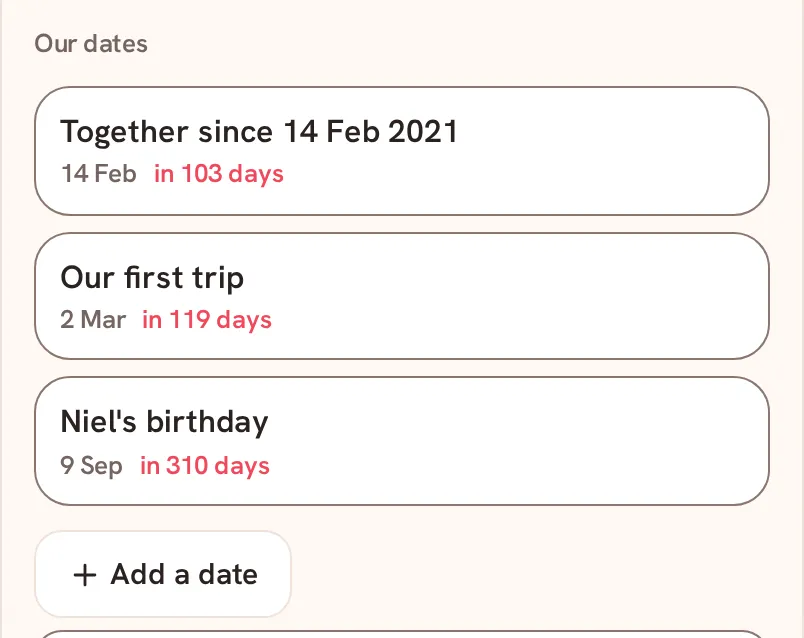
To change a date, tap its row, edit it and tap Save. To delete it, tap Remove in the same sheet.
Saath Couples App
Join the waitlistWhat your partner sees
Our dates is shared. Your partner sees every date you save, and can add, change or remove dates too. Removing asks first: "Remove this date? It goes for both of you."
Questions about your dates
What is the difference between the four kinds?
Together since and Birthday repeat every year. Anniversary and Our own date have a Title, and you can tick Every year or leave it as a one-off.
When do the reminders come?
A week before the date and on the day. Each of you gets the reminder on your own day, in your own time zone.
Is there a limit?
You can keep up to 50 dates. At the limit Saath says "You can keep up to 50 dates."
What if I have no signal?
The section shows Offline. Add a date waits and says Needs connection until you are back online.
Can I save the same date twice?
No. Saath says "You already saved this date." If your partner changed a date first, it says "This date changed. Check it and try again."
Does the Saath couples app count days together?
No. Each row shows how soon the next date comes, such as "in 103 days", not how long you have been together.