Browse guides
Saath Couples App · Add something
Add anything from the + button
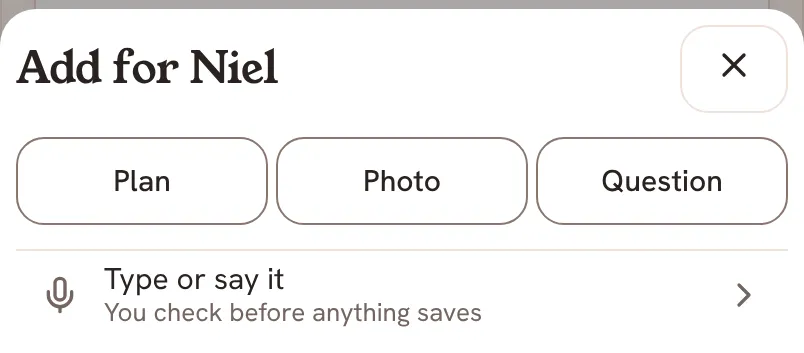
The + button is how you add things in the Saath couples app. On Today it offers Plan, Photo, Question and Check in. On Plans it offers Plan, Idea and Free time. Type or say it sits under both.
Every tab of the Saath couples app has the same round + button in the middle of the bar, so you can add something without leaving the screen you are on.
Add something with the + button
- Tap the + button. On Today, Chat or Us the sheet is called Add for followed by your partner's name. On Plans it is called Add to Plans.
- On Today, Chat or Us, choose Plan, Photo, Question or Check in. On Plans, choose Plan, Idea or Free time.
- Fill in the sheet that opens. Plan opens Plan something. Photo opens Add a photo. Idea opens Save an idea, for a place or a link to keep for later.
- Or tap Type or say it, under the choices, and write or speak what you want to add. You check it before anything saves.
- Tap the cross, Close, to leave without adding anything. In a sheet, the arrow at the top takes you back to the choices.
Saath Couples App
Join the waitlistWhat your partner sees
It depends on the choice. A plan asks your partner to answer, and so does a question. Free time shares when you are free, so Plans can find a window for both of you. An idea goes to Our list, which you share. Each sheet shows what it does before you send.
Questions about the + button
Why do I not see Question or Check in?
Question shows once your partner has joined, because it asks them something. Check in shows when you have a goal to check in on.
What works offline in the Saath couples app?
The sheet says so under the choices. On Today it says Offline. and that a photo sends when you are back, and that Plan, Question and Check in need a connection. On Plans it says an idea saves when you are back, and that Plan and Free time need a connection.
Can I undo something I added?
Some things show Undo on a bar for a few seconds after you add them, such as a photo or the changes from Type or say it. Otherwise you can take an item off from where it now lives, for example Delete plan on Our list.
Where does each choice go?
A plan goes to Plans, then to Coming Up once you are both in. An idea goes to Our list. A question goes to your partner to answer. A photo becomes a moment in your story. A check-in goes to its goal.
Is the + button the same on every tab?
Today, Chat and Us share one menu. Plans has its own, because it adds things that belong on Plans.