Browse guides
Saath Couples App · Us
Add a shared cost, split it and settle up
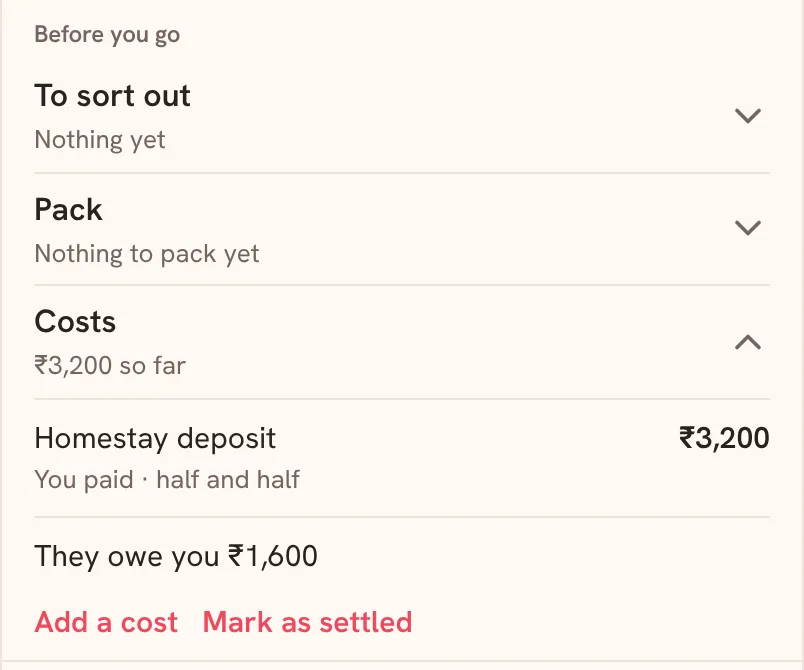
Shared costs in the Saath couples app keep track of what each of you paid for a plan or a trip. Open the trip or plan, tap Costs, then Add a cost. Saath shows who owes whom and lets you mark it as settled.
Add a cost and settle up
Shared costs in the Saath couples app live on the plan or trip they belong to, so nothing is lost in the chat.
- Open Us, tap Together and open a trip, or open a plan. On a trip, tap Costs under Before you go.
- Tap Add a cost.
- Enter the Amount and the Currency.
- Choose Who paid?, you or your partner.
- Choose Half each, or Custom and type Your share (%).
- Add a Note (optional), then tap Add.
- When you have paid each other back, tap Mark as settled.
Saath Couples App
Join the waitlistWhat your partner sees
Your partner sees the same costs, who paid, how each was split and the balance, for example that they owe you an amount. Each cost shows who paid and the split.
Questions about shared costs
What does the balance say?
It tells you the total so far, then who owes whom, in the form You owe a name and an amount, or the name owes you an amount. When nothing is owed it says All settled. With more than one currency, each is shown and settled on its own.
Can I change or remove a cost?
Yes. Each cost has Edit and Remove. Under History you can see changes, including a cost that someone removed.
What if I tick Mark as settled by mistake?
The app shows Settled with an undo for a moment. Tap it to take it back.
What if the amount is not accepted?
The app says Enter an amount with no more than two decimal places. Fix the amount and tap Add again.
What if I have no signal?
Costs need a connection. The app says Needs a connection. or Could not save this cost. Try again. Reconnect and tap Try again.
Can I see all my costs together?
Where costs are open, a Shared costs card with Open costs shows them across your plans and trips.
Is this free in the Saath couples app?
The Premium page lists trips with their costs among what Premium adds. Open Settings and tap Premium to see where you both stand.
More guides
Back to the guide hub. Next, read Us and Lists.