Browse guides
Saath Couples App · Get started
Change your language, time zone and city in Saath
In the Saath couples app, your language, time zone and city live on one page. Open Us, tap the gear icon, then tap your name. Pick a language, choose a time zone, and add your city so plans and times fit where you are.
Language, time zone and city decide which words, clocks and place the Saath couples app uses for you, and this guide shows where to set each one.
Set your language, time zone and city
- Open Us and tap the gear icon at the top to open Settings.
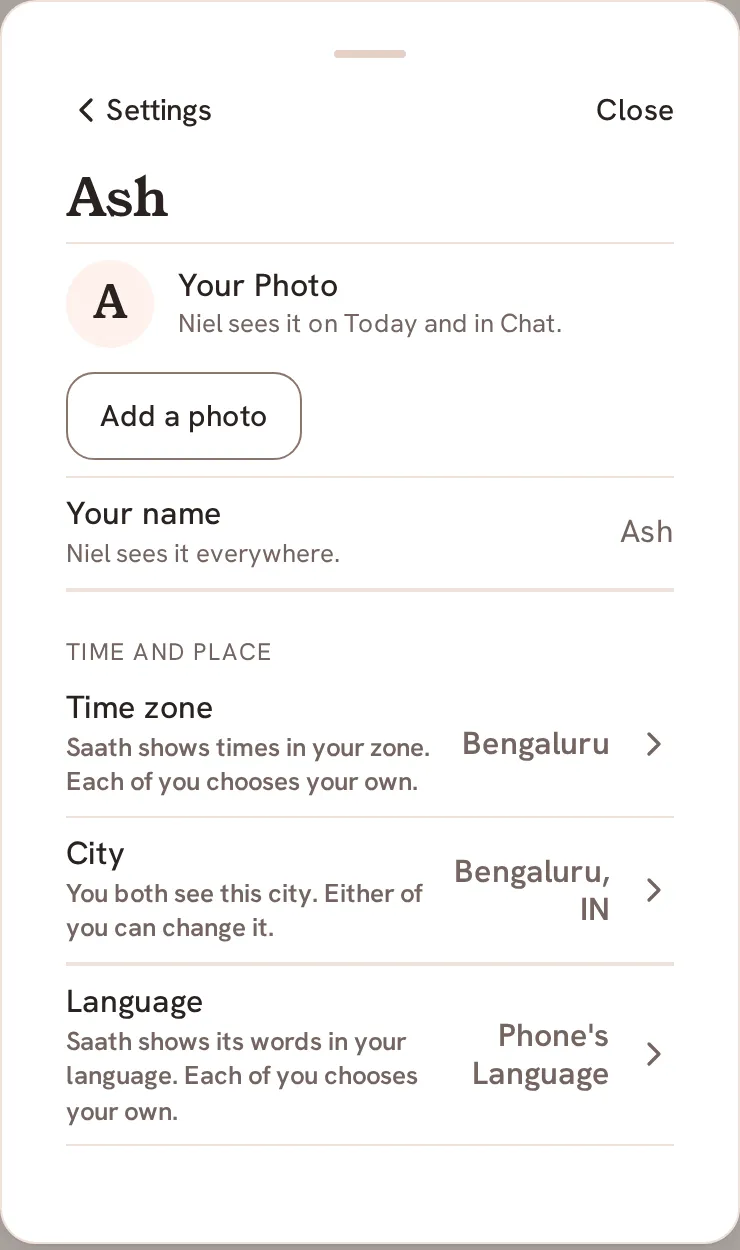
- Tap your name, the first row.
- For your language, tap Language, then tap the language you want to read. The tick moves to it and Saath changes its words at once. Choose Phone's Language to follow your phone instead.
- For your time zone, tap Time zone under Time and place, then pick a zone from the list under Your Time Zone. It saves as soon as you pick it.
- For your city, tap City, then tap Add City. If a city is already there, tap Change.
- Fill in City, Country Code (two letters, such as IN) and City Time Zone, then tap Save City. Tap Cancel to leave without saving.
Saath Couples App
Join the waitlistWhat your partner sees
Language and time zone are yours alone. The page says "Each of you chooses your own," so your choice never changes your partner's phone. Once you have both saved a time zone, Saath can show your partner's local time beside yours on Today and when you call. The city can be shared: the City row says whether you both see it and either of you can change it, or only you see it.
Questions about language, time zone and city
Can I undo it?
Yes. Pick another language or zone at any time, or tap Phone's Language to follow your phone again. For your city, tap Change and save a new one.
What if I have no signal?
The page says Connect to change these. For your city it says Connect to change your city. Try again when you are back online.
What if it does not save?
Saath says Could not save. Try again. Your earlier choice stays. If a page cannot load, tap Try Again.
Why do I not see Time and place or City?
These rows are shown only when they are switched on for your account. The Language row appears whenever Saath has more than one language to offer.
What happens to shared costs if I change my city?
When the country changes, the page says new shared costs start in the new country's currency, and costs already added keep theirs.
Does my language change my partner's words?
No. Each of you reads Saath in your own language, so one of you can read English while the other reads another language.